Planning a weekend getaway is one thing. Planning a full year of travel with a family of four? That’s a whole different level of logistics.
Between flights, accommodations, budgets, multiple currencies, and occasionally traveling with friends and extended family, staying organized quickly becomes the difference between excitement and being totally overwhelmed. Over the past few months of planning and the past few years of travelling, we’ve landed on a small set of apps that help keep everything running smoothly.
Here’s a look at the tools we use to stay organized while planning long-term travel, what each one does well, and how they fit into our overall system.
TripIt: One Home for All Our Travel Details
TripIt is the backbone of our travel planning.
At its core, TripIt is an app that holds all your flight, accommodation, and transportation information in one place. Instead of digging through confirmation emails or forwarding screenshots back and forth, everything lives neatly inside a single timeline.
Once we book a flight or accommodation, we forward the confirmation email to TripIt, and it automatically creates a trip with all the relevant details—dates, times, addresses, and confirmation numbers. For a year of travel that includes dozens of flights and stays, having everything centralized is a huge mental relief.
Why we love it:
- All flights and accommodations in one spot
- Easy-to-read timelines for each leg of the trip
- Perfect for quick checks at the airport or on the road
- No more frantic email searching
- You can have multiple people on the same account so we all see the same thing
Although we love TripIt, it’s only as accurate as the latest email you sent it. We actually missed a flight because the flight time had changed but our Tripit App had stale information in. It’s great for high level summary, but it’s worth double checking flight time and details that can change.
WhatsApp: Keeping Everyone on the Same Page
While TripIt handles what we’ve booked, WhatsApp handles how we coordinate—especially when other people are involved.
We created a sabbatical community on WhatsApp, with a separate group for each destination. For the parts of the trip where we’re traveling with other families or friends, everyone joins the group for that specific location.
Anything relevant to that destination goes into that chat:
- Activity ideas and must‑see spots
- Accommodation addresses and check‑in details
- Transportation plans
- Local resources, tips, or recommendations
Instead of information being scattered across text messages, emails, and multiple apps, everything lives in one place that everyone can easily reference. It keeps communication streamlined and ensures we’re all working from the same information—without endless back‑and‑forth.
Why this works so well:
- One chat per destination keeps things organized
- Easy sharing of links, screenshots, and locations
- Perfect for group coordination without information overload
- Everyone has access to the same details
For group travel especially, WhatsApp has been key to keeping plans clear and reducing confusion.
Splitwise: Keeping Shared Costs Simple (and Drama-Free)
As mentioned, on some legs of our upcoming travel, we’re traveling with friends or family, sharing accommodations, rental cars, or group activities.
That’s where Splitwise comes in.
Splitwise lets us track shared expenses and automatically calculate who owes what. Instead of trying to remember who paid for dinner three weeks ago or settling up with rough estimates, everything is logged clearly and fairly. We’ve used this app for years now on a number of different group trips and it’s amazing. We don’t have to split resuturant bills or worry about who’s paying for what, it all just goes in the app and it tells you how much you each owe to settle up at the end.
How we use it:
- Shared accommodations with friends
- Group transportation (cars, taxis, ferries)
- Meals or activities we split with others
Each person can add expenses, choose how they’re divided, and see balances update in real time. It can split things out more than just 50/50. For example, when traveling with just one person, we pick up 4/5th of some expenses and they pick up 1/5th. It’s typically something we discuss with our travel companions before the trip to make sure everyone is on the same page about how expenses will split. It removes arguing about who’s turn it is to pay the bill and lets everyone enjoy the trip without constantly pulling out calculators.
TrabeePocket: Tracking Expenses Across Countries and Currencies
For day-to-day spending and long-term budgeting, we use TrabeePocket as our expense tracker.
What makes TrabeePocket especially useful for extended international travel is its ability to:
- Track expenses in multiple currencies
- Break spending into different trips or “legs”
- Categorize expenses (food, transport, accommodation, etc.)
We set up each country or major section of our journey as its own trip within the app. That way, we can see exactly how much we’re spending in each place without everything blurring together but also get an overall view of how much is being spent over the entirety of our sabbatical. We have a budget in mind (maybe we’ll talk about that in another post) but it’ll be really interested to see how close we really get.
Why it works for us:
- Great for long, multi-country travel
- Easy currency handling
- Clear spending summaries
- Helps us stay honest about our budget
It’s not about tracking every cent perfectly—it’s about awareness. TrabeePocket gives us a realistic picture of how our travel style aligns with our budget and where we might need to adjust.
The Real MVP: Our Giant Excel Spreadsheet
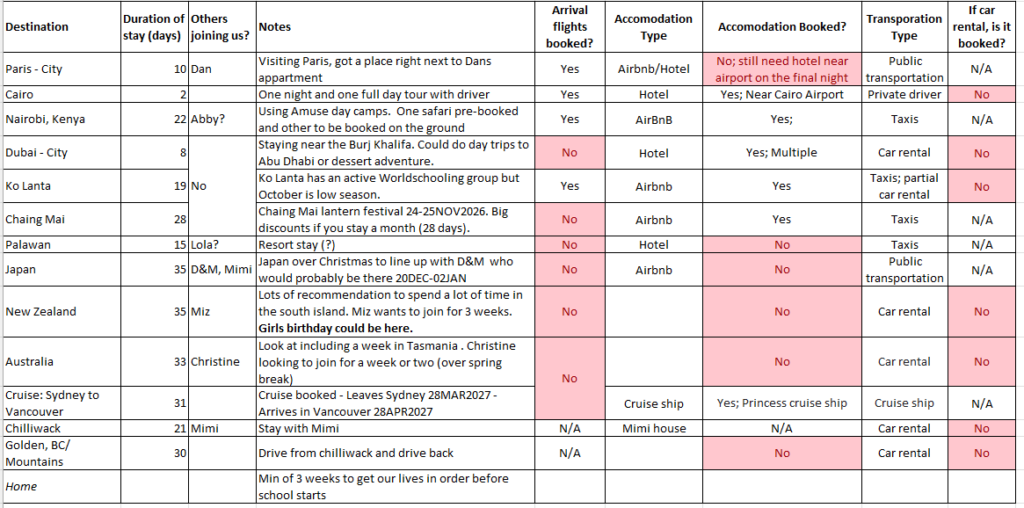
As much as we love travel apps, the single most important tool we use to stay organized is… a giant spreadsheet in Excel.
This spreadsheet is the master plan. The big picture. The place where everything comes together.
Our Excel file includes:
- A high-level itinerary for the entire year
- Dates, locations, and travel days
- Confirmation numbers
- Accommodation plans (booked vs. tentative)
- Visa timelines and important deadlines
- Notes, ideas, and backup options
Spreadsheets aren’t glamorous, but they’re incredibly powerful. Excel lets us customize everything exactly the way we want, move plans around easily, and see the entire year at a glance.
When plans change (and they always do), the spreadsheet is where we go first. The apps support the plan—but the spreadsheet is the plan.
Final Thoughts
I consider myself a very proficient planner. I planned our wedding and that this point over 20 trips all over the world. But planning a year of travel is a whole new challenge, especially with kids in the mix. But having the right tools makes a massive difference. Once the systems are in place, we spend less time managing logistics and more time getting excited about the adventure ahead.
If there’s one takeaway, it’s this: use apps to simplify the details—but don’t underestimate the power of a well-loved spreadsheet.
If you have another travel planning app that you love, we’d love to hear about it.